HR Inside WordPress. No Per-Employee Fees.
Employee records, leave and approvals in your WordPress dashboard.
We’ve been using the HR module for over 2 years as a Job Board solution. Very easy to setup, all the functions we were looking for, and easy to add admins and users. We haven’t bumped into any hiccup so far.


5,000+ active installs worldwide
- employees, no per-employee fees
- Unlimited
- free core plugin
- $0
- Starter plan, priced by site
- $99/yr
- Guided setup steps
- 07
Your HR Bill Grows Faster Than Your Team
Every new hire costs more
Per-employee pricing bills you again for each person.
Leave lives in spreadsheets
Nobody is sure how many days are left, or why.
Your staff data is not yours
Salaries and personal details sit on their servers.
Approvals stall in inboxes
Requests wait in email threads for an answer.

Two Ways To Run HR
One charges you for every person. One lets you add as many as you need.
| Key Factors | Cloud HR Tool | |
|---|---|---|
| Pricing model | Monthly fee per employee | Free core, flat-price Pro |
| Where staff data lives | On their servers | In your own WordPress database |
| Adding a new hire | Your bill goes up | Unlimited employees included |
| How you access it | A separate login | Inside your WP admin |
See Your Actual Savings
Move the sliders to compare a per-employee cloud HR tool against FlyHR's flat yearly price.
Saves $2,301 a year versus $2,400 for a cloud tool.
Cloud HR Tool
$2,400/yr
$2,301/yrSaved
$99/yr, unlimited
Everything You Need To Run Your People
Everything below is in the free plugin.
People
- Employee DirectorySearch and filter everyone, by status
- Full ProfilesJob, contact and pay details in one record
- Job HistorySee what changed in a role, and when
- Private HR NotesNotes only your HR team can read
- Exit And RehireEnd employment, keep the record, restore it later
Leave
- Leave TypesAnnual, sick, casual and your own
- Leave PoliciesDifferent rules for different groups
- EntitlementsGive days to one person or a whole group
- ApprovalsHR managers and department leads decide
- Leave CalendarWho is away, by month, week or day
Setup And Control
- Setup WizardSeven short steps to a working HR system
- DepartmentsParent and child teams, each with a lead
- Workdays And HolidaysFull, half and non-working days
- RolesHR Manager and Employee access levels
- Email AlertsRequests, approvals and rejections by email
More In Free
- AnnouncementsNews for everyone or one team
- HR ReportsHead count, service, salary history
- Performance ReviewsRatings and comments on each profile
- Requests HubResignation and remote work requests
- Import And ExportMove employee data by CSV
Pro Modules
Add payroll, attendance, recruitment and more when you need them. Priced by site, never per employee.






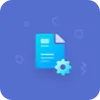

Lives Where You Already Work
No new app and no new login. FlyHR runs inside your WordPress admin.
No New App
It runs inside your WordPress admin.
One Login
Staff use their WordPress account.
Won't Slow Your Site
Heavy work runs quietly in the background.
Invisible to Visitors
Nothing shows on your public site, whatever your theme.
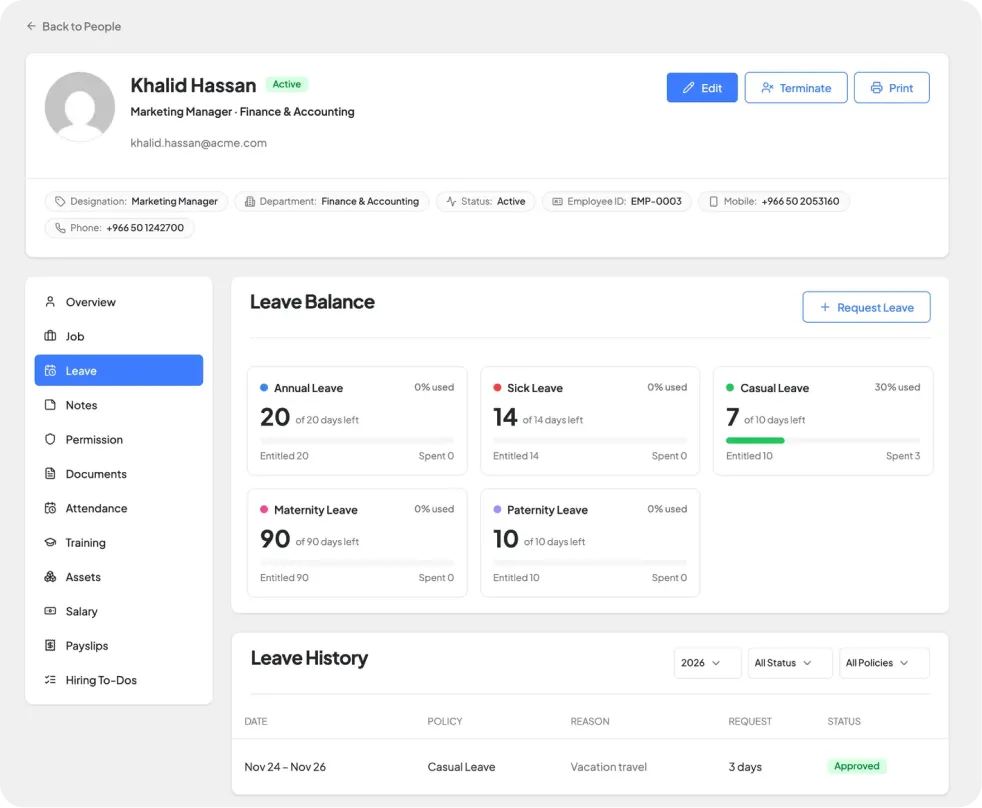
Every Leave Balance Shows Its Working
Each balance comes with its history, so you always know how it got there.
Traceable Balances
Every day given, taken or given back is logged.
Rules per Group
Different leave by type, team, location and more.
Waiting Periods
Leave can start after probation.
Right Approver
Leads approve their team, HR approves anyone.

How a Leave Day Moves
One request, from policy to balance, in five stages.
Policy assigned
Employee requests
Dates checked against workdays and holidays
Lead or HR decides
Balance updated, with history
Your HR In Every Employee's Pocket
The FlyHR mobile app for Android and iOS, published under your own brand.


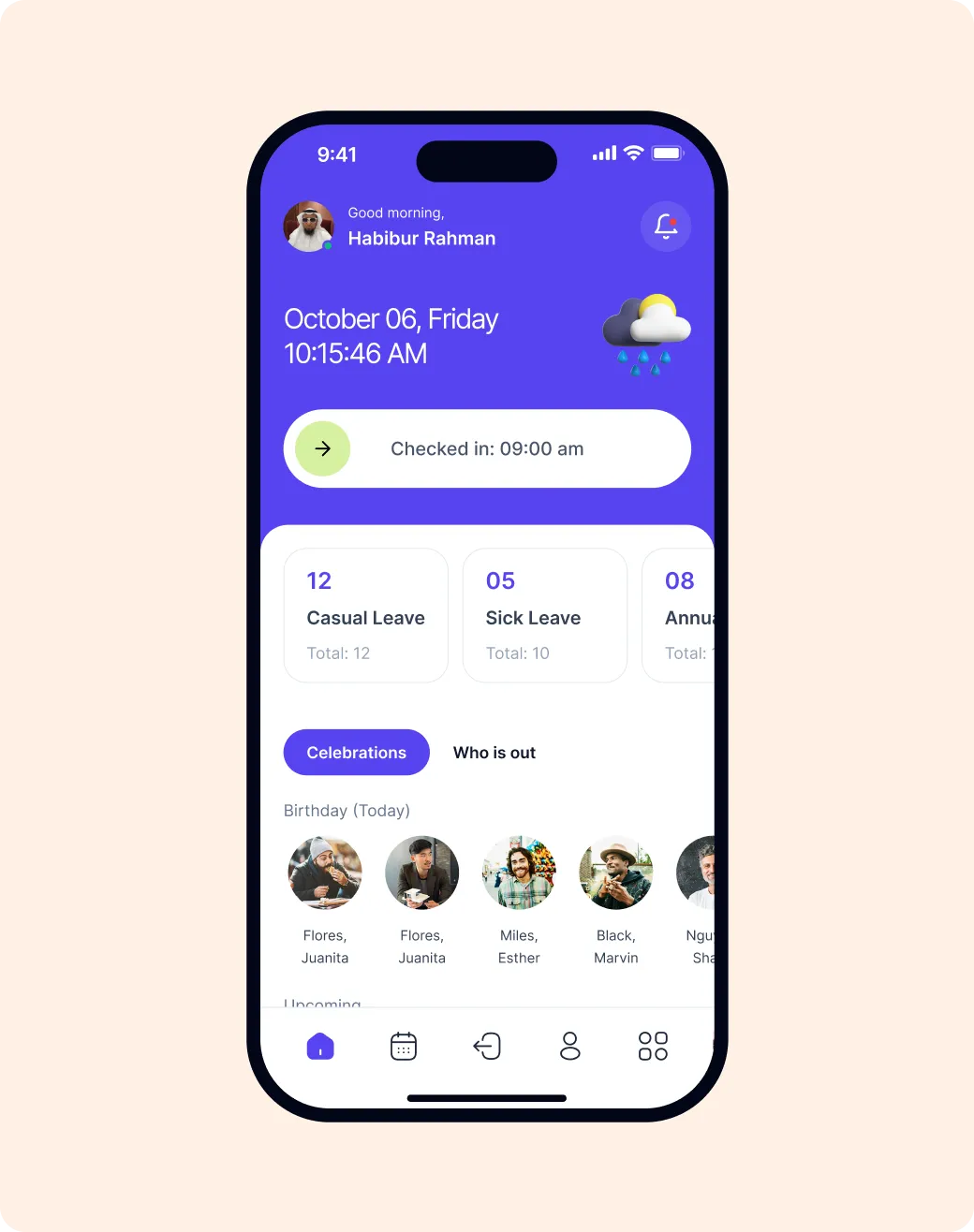
Slide to Check In
Attendance from the phone.
Leave on the Go
Check balances and request leave anywhere.
Team Directory
Call, message or email anyone in one tap.
Who's Out Today
Leave, birthdays and anniversaries at a glance.
Built For How Your Team Works
From a ten-person shop to an agency running HR for its clients.
Small Businesses
- Replace the staff spreadsheet for good
- Up and running in seven guided steps
- Start free, upgrade only when you need to
Growing Teams
- New hires get the right leave automatically
- Staff answer their own balance questions
- Every role change kept on record
Multi-Office Companies
- Different leave for each office or contract type
- Each department handles its own approvals
- One calendar across every team
Agencies
- Set up HR on a client's own WordPress
- The client's staff data stays with the client
- Each plan covers one client site
Trusted By WordPress Teams Worldwide
We’ve been using the HR module for over 2 years as a Job Board solution. Very easy to setup, all the functions we were looking for, and easy to add admins and users. We haven’t bumped into any hiccup so far.
I was looking for a plugin to assist in keeping an up-to-date record of my staff and their details. After searching for a while, I came across this plugin and it was a godsend. It’s got everything I need and it looks amazing so much so it doesn’t look like a wordpress site. …
We are small business with 80 employees, and we have been looking for appropriate solution for company management, and found wp-erp. It was great plugin which meet our demands, almost completely. It is very user friendly plugin …
I think this is one of the best plugins for HR. …
When you want only limited features then this HRM plugin will be the best option for free and they have great support they respond as soon as possible.
The best ERP, CRM and H&R Plugin for WordPress! We definitely recommend using it.
Can I start free and upgrade later
Yes. Start with the free plugin from WordPress.org and move to a Pro plan when you need it. Pro is priced by site, never per employee.
How many employees can I add
As many as you like. FlyHR does not charge per employee on any plan.
Can employees request leave themselves
Yes. Staff sign in with their WordPress account, see their own balances, file requests and follow each request's status.
What happens when an employee leaves
End their employment and the record and its job history are kept. If they come back, reactivate the record instead of starting again.
Does it work with my theme
Yes. FlyHR runs inside the WordPress admin and adds nothing to your public pages, so your theme does not affect it.
Can I translate FlyHR
Yes. Every word on screen can be translated with the standard WordPress translation tools.