
Hire More. Pay the Same.
Unlimited employees and no per-seat fees. Start free, then pay yearly or once for a lifetime.
Free
Run HR for your whole team. No card needed.
$0free forever
What's included
- Unlimited employees
- Employee profiles
- Departments and designations
- Org chart
- Leave policies and requests
- Holidays with iCal import
- Announcements
- Performance reviews and goals
- Birthday and anniversary emails
- 6 HR reports
Starter
Track time and run leave by the rules.
$99per year
Everything in Free, plus
- Attendance and shifts
- Self check-in with IP whitelist
- Late, early and overtime tracking
- Attendance reports
- Half-day leave
- Accrual and carry-forward
- Multi-level approval
- Remote work requests
- Weekly HR digest
Business
Most popularPay your people correctly, every month.
$249per year
Everything in Starter, plus
- Payroll with pay calendars
- Payslips by email
- Attendance-based pay
- Bank payment export
- Expense reimbursement
- Leave encashment
- Company and employee documents
- Document sharing by team
- Dropbox document storage
- Custom employee fields
- Resignation requests
Agency
Hire, train and automate as you grow.
$499per year
Everything in Business, plus
- Careers page and job board
- Google for Jobs listing
- Candidate pipeline and stages
- AI Job Post Writer
- AI Talent Pool (CV scoring)
- Workflow automation
- Training with auto-assign
- Asset tracking and requests
- SMS notifications
FlyHR mobile app(iOS and Android)Free
Your HR In Every Employee's Pocket
Free with the Agency plan for every employee, on Android and iOS. Custom-branded builds are sold separately.


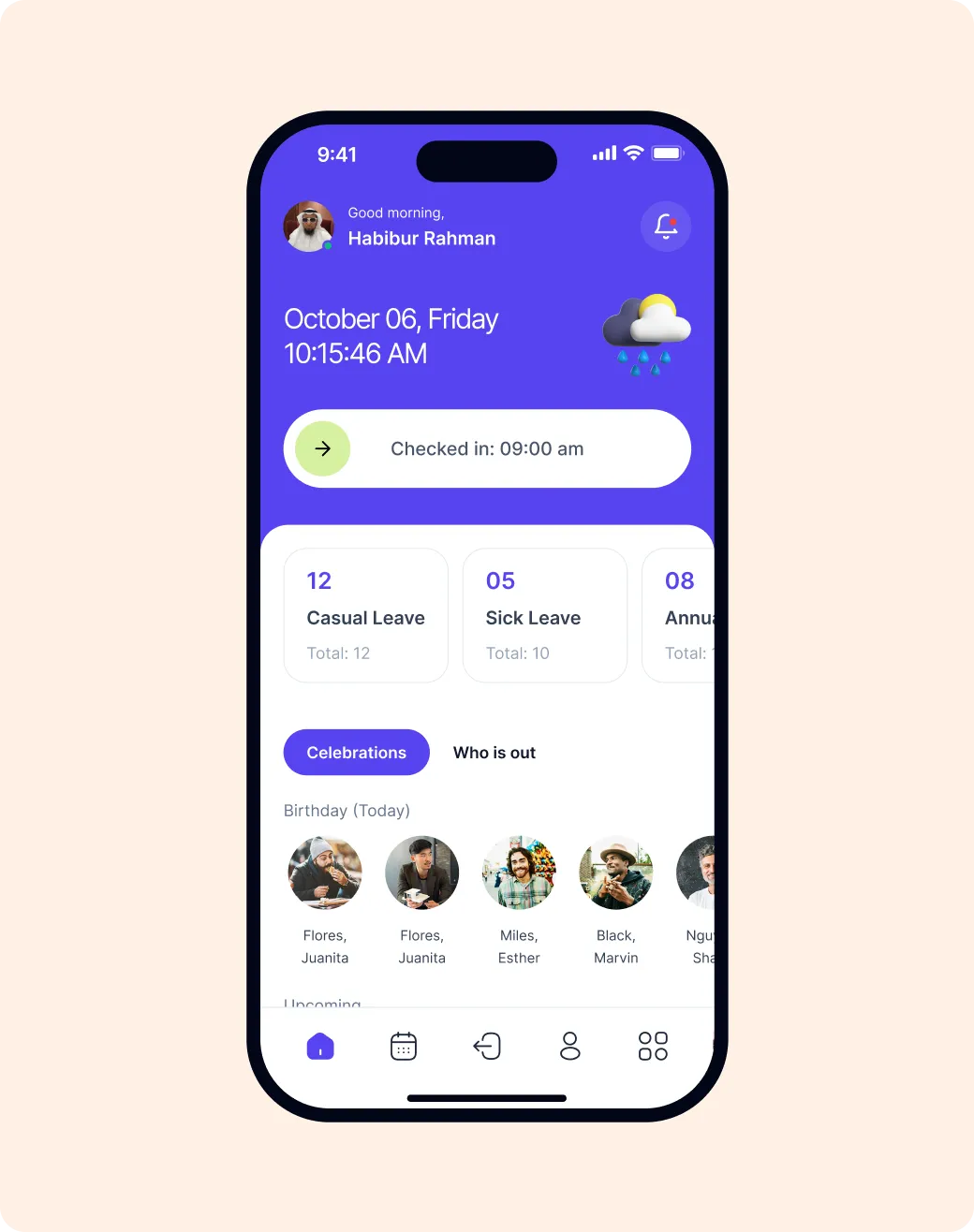
Slide to Check In
Attendance from the phone.
Leave on the Go
Check balances and request leave anywhere.
Team Directory
Call, message or email anyone in one tap.
Who's Out Today
Leave, birthdays and anniversaries at a glance.
Compare Plans
Unlimited employees on every plan, Free included.
| Feature | Free$0 free forever | Starter$99 per year | Business$249 per year | Agency$499 per year |
|---|---|---|---|---|
| Core HR | ||||
| Unlimited employeesAdd your whole team. There is no cap and no per-person fee on any plan. | Included | Included | Included | Included |
| Employee profiles, job and pay historyOne page per person, with a record of every change to their role, status and pay. | Included | Included | Included | Included |
| Departments, designations, org chartSet up departments, with sub-departments, and job titles, then see who reports to whom. | Included | Included | Included | Included |
| Employee CSV import and exportBring your team in from a spreadsheet, or download everyone in one file. | Included | Included | Included | Included |
| Termination trackingRecord when someone leaves, the type of exit and the reason. | Included | Included | Included | Included |
| Announcements by team or personPost news to everyone, one department, one job title or selected people. They get it by email too. | Included | Included | Included | Included |
| Performance reviews and goalsRate people on five criteria, leave comments, and set goals to check back on. | Included | Included | Included | Included |
| Birthday and anniversary emailsFlyHR sends birthday and work-anniversary wishes for you, plus a welcome email to new hires. | Included | Included | Included | Included |
| 6 HR reportsHead count, age, gender, years of service, salary history and leave, ready without setup. | Included | Included | Included | Included |
| HR audit logSee who changed what in HR, and when. | Included | Included | Included | Included |
| REST APIRead and update employees, departments, leave and reports from other tools. | Included | Included | Included | Included |
| Weekly or monthly HR digest emailA weekly or monthly email to HR managers: new joiners, birthdays, who is out, contracts ending, work anniversaries. | Not included | Included | Included | Included |
| Leave | ||||
| Leave policies, entitlements, calendarSet leave rules by department, job title, gender, marital status or location, assign them in bulk, and see everyone on one calendar. | Included | Included | Included | Included |
| Holidays with iCal / CSV importAdd public holidays by hand or import a whole year from an iCal or CSV file. | Included | Included | Included | Included |
| Bulk approve leave requestsTick several requests and approve or reject them in one click. | Included | Included | Included | Included |
| Half-day leave (morning / afternoon)Let people take a morning or an afternoon off, so balances stay accurate. | Not included | Included | Included | Included |
| Leave accrualLeave builds up month by month instead of landing all on day one. | Not included | Included | Included | Included |
| Leave carry-forwardRoll unused leave days into next year, up to a limit you set per policy. | Not included | Included | Included | Included |
| Leave encashmentPay out unused leave days instead of losing them, up to a limit you set. | Not included | Not included | Included | Included |
| Multi-level approvalThe team lead approves first, then it goes to HR for the final say. | Not included | Included | Included | Included |
| Sandwich ruleWeekends and holidays that fall between leave days count as leave too. | Not included | Included | Included | Included |
| Monthly leave split (segregation)Split a leave policy's days across the months of the year. | Not included | Included | Included | Included |
| Unpaid leave reportCalculate unpaid leave days for each person and export the list. | Not included | Included | Included | Included |
| Attendance | ||||
| Shifts and bulk shift assignmentCreate shifts and assign them to a whole department or job title at once. | Not included | Included | Included | Included |
| Self check-in and check-outPeople clock in and out themselves from their dashboard. | Not included | Included | Included | Included |
| IP whitelist for check-inOnly allow check-in from the IP addresses you list, such as the office network. | Not included | Included | Included | Included |
| Grace time, late, early-leave, overtimeSet grace minutes for check-in and check-out. FlyHR then flags late arrivals, early exits, overtime and missed check-outs. | Not included | Included | Included | Included |
| Attendance reports with CSV exportSee attendance by date or by person, and export to CSV. | Not included | Included | Included | Included |
| Attendance CSV importImport attendance records from a CSV file, shift by shift. A sample file is included. | Not included | Included | Included | Included |
| Attendance reminder emailsAn email that reminds employees to check in. | Not included | Included | Included | Included |
| Employee access | ||||
| My Profile in wp-adminEach employee can see their own profile and leave inside the WordPress dashboard. | Included | Included | Included | Included |
| Remote work requestsStaff ask for remote work days, picking a reason, and HR approves in Requests. | Not included | Included | Included | Included |
| Resignation requestsStaff resign through FlyHR, HR approves, and the request can be withdrawn. | Not included | Not included | Included | Included |
| Pay and records | ||||
| Payroll: hourly, weekly, biweekly, monthlySet pay calendars for each group. Each pay run goes through employees, variable input, payslips and approval. | Not included | Not included | Included | Included |
| Allowances, deductions and tax itemsBuild pay from allowances, deductions and tax lines, with one-off extras per pay run. | Not included | Not included | Included | Included |
| Attendance-based payPay by the day, worked out from attendance records. | Not included | Not included | Included | Included |
| Payslips: print, email, employee viewPrint or email payslips one by one or in bulk. Staff see their own in their dashboard. | Not included | Not included | Included | Included |
| Pay run reports and bank CSV exportSummaries by pay run or by person, plus a file for your bank transfer. | Not included | Not included | Included | Included |
| Expense reimbursementStaff claim expenses with line items and attachments, HR approves, and you record the payment. | Not included | Not included | Included | Included |
| Company and employee documentsKeep company files in folders, and each person's documents on their profile. | Not included | Not included | Included | Included |
| Share documents by team or personShare a file with everyone, a department, a job title or chosen people. They get an email. | Not included | Not included | Included | Included |
| Dropbox document storageKeep HR documents in your Dropbox instead of on your server. | Not included | Not included | Included | Included |
| Custom employee fieldsAdd your own fields to employee profiles, like shirt size or visa expiry, in 12 field types. | Not included | Not included | Included | Included |
| Hiring | ||||
| Careers page and job boardPut a jobs page on your site where people apply and upload their CV. | Not included | Not included | Not included | Included |
| Google for Jobs listingYour openings can show up in Google's job search. | Not included | Not included | Not included | Included |
| Candidate pipeline, stages, ratingsMove applicants through stages such as Screening, Phone Interview and Make an Offer, with 1–5 ratings and comments. | Not included | Not included | Not included | Included |
| Question sets and interview calendarAdd screening questions to applications, and see interviews and to-dos on a calendar. | Not included | Not included | Not included | Included |
| Convert candidate to employeeHire someone and their details become an employee profile. No retyping. | Not included | Not included | Not included | Included |
| Daily new-applicant email to hiring leadThe hiring lead gets one email a day with the new applicants. | Not included | Not included | Not included | Included |
| AI Job Post WriterFill in a short form and AI drafts the full job post for you to edit. | Not included | Not included | Not included | Included |
| AI Talent Pool (CV scoring)AI reads each PDF CV, scores it against the job, and lists strengths and missing skills. | Not included | Not included | Not included | Included |
| Automate and manage | ||||
| Workflow automation with delaysSet "when this happens, do that" rules, with conditions and a delay if you want one. | Not included | Not included | Not included | Included |
| Training with auto-assign to new hiresPlan training, assign it to teams, and give it to every new hire automatically. | Not included | Not included | Not included | Included |
| Asset tracking, requests, overdue alertsKnow who has which laptop or phone, with warranty dates and an alert when a return is late. | Not included | Not included | Not included | Included |
| SMS via Twilio, Vonage, Clickatell and moreSend announcements and workflow alerts by text, through Twilio, Vonage, Clickatell, SMSGlobal or Infobip. | Not included | Not included | Not included | Included |
| FlyHR mobile app (iOS and Android)Free with Agency, for every employee. They check in, request leave, check balances, browse the team directory and get announcements on their phone. Everything syncs with your site. | Not included | Not included | Not included | Free |
See Your Actual Savings
Move the sliders to compare a per-employee cloud HR tool against FlyHR's flat yearly price.
Saves $2,301 a year versus $2,400 for a cloud tool.
Cloud HR Tool
$2,400/yr
$2,301/yrSaved

$99/yr, unlimited
Is there a limit on employees?
No. Every plan, including Free, has unlimited employee records. You never pay per head.
How many sites does a plan cover?
Each plan covers one WordPress site. Most companies run HR on one site.
What do I need for the AI features?
Your own API key from OpenAI, Anthropic Claude, Google Gemini or OpenRouter. FlyHR connects to the provider you choose, and you pay that provider for usage.
Where is my HR data stored?
In your own WordPress database. FlyHR runs on your site, so employee records never leave it.
Do you offer refunds?
Yes. If FlyHR is not right for you, ask for a full refund within 14 days.

Ready To Stop Paying Per Employee?
Free to use. Your data stays on your server.